Estimated read time: 8 minutes.
If you have searched for the difference between SCADA and HMI, you are not alone. Google still shows that question far down the results, and most pages answer it with a textbook table that never mentions a real panel. This guide is the practical version: what an HMI is, what SCADA is, where each one sits next to the PLC, and how you should train for both if you work in a plant in Peninsular Malaysia, Sabah, Sarawak or Singapore.
HMI vs SCADA is not a brand contest. They are two layers of the same control system. Mix them up in a job interview, a shutdown meeting or a training request, and you will buy the wrong scope. Read this once, and you will know which screen belongs where.
HMI vs SCADA in one sentence each
An HMI, a Human Machine Interface, is the local screen an operator uses to run one machine or one skid. A SCADA system, Supervisory Control and Data Acquisition, is the plant-wide layer that watches many machines, stores history, and raises alarms across an area.
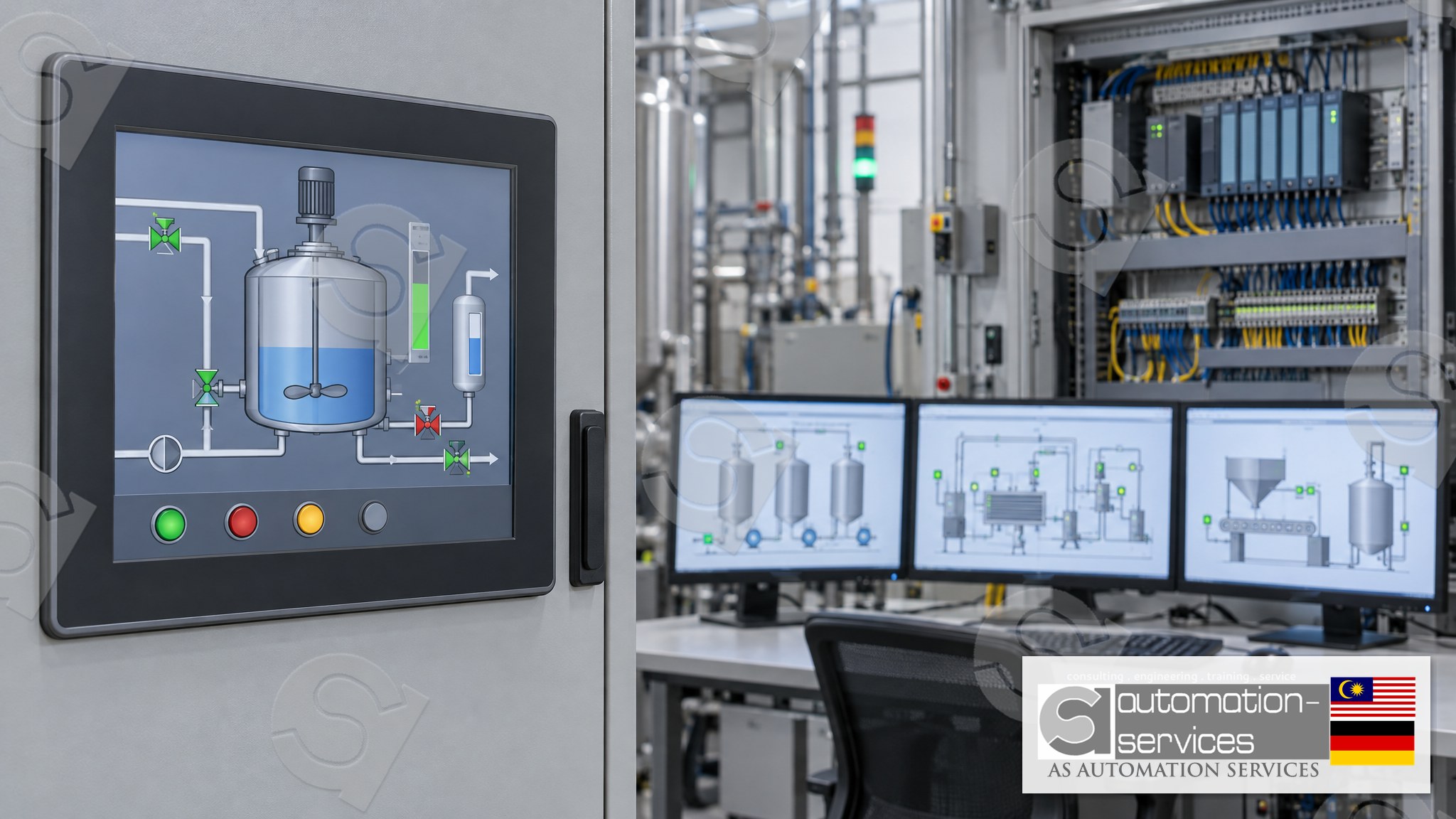
Think of a filling line in a Johor food plant. The touch panel on the filler is the HMI. The PC in the control room that shows every filler, the CIP skid and the cold room on one page is SCADA. Both talk to PLCs. Neither replaces the PLC. The PLC still owns the logic, the interlocks and the safety-related decisions.
What an HMI actually does beside a PLC
On the brands we train, the HMI is a panel you mount on the cabinet door. Siemens uses WinCC Comfort or WinCC Flexible. Mitsubishi lines we teach pair an FX5U with a Weintek panel. Omron uses an NB panel. Keyence uses VT Studio. Schneider uses Vijeo Designer. The job is the same on every brand.
- Show the machine state: running, stopped, faulted, in manual.
- Give the operator start, stop, jog and recipe buttons, with the right access level.
- Display live values the PLC already has: tank level, motor current, temperature.
- Show active alarms for that machine, not for the whole factory.
- Let a technician force a manual mode during a changeover, inside limits the PLC allows.
The HMI does not decide. If you press Start and a level switch is low, the PLC ignores the button. A good screen makes that refusal obvious.
What you should not expect from an HMI
A panel is not a historian. Most HMIs keep a short alarm list and a few trend pens. They do not store a year of batch records, and they do not supervise ten lines at once. If a manager asks the panel for last quarter's downtime, that is a SCADA question, not an HMI question.
What SCADA adds that an HMI cannot
SCADA sits above several PLCs. It collects tags over the plant network, draws area pages, logs values, and sends alarms to the people on shift. In a 5-day course the SCADA block comes after you can read and write PLC tags, because a screen is only as honest as the tags under it.
A useful SCADA page for a Malaysian plant usually covers four jobs:
- Supervision. One view of every skid, so a supervisor sees a stopped line without walking the floor.
- Acquisition. Trending and reports: flow totals, batch times, alarm frequency.
- Alarming across areas. A high-high level in the tank farm should reach the control room, not only the local panel.
- Setpoint distribution. A recipe written once, sent to several PLCs, with a record of who changed it.
SCADA vs HMI is therefore a scope question. One machine, one operator, one cabinet: HMI. Many machines, a control room, a need for history: SCADA, with HMIs still on the machines.
The difference between SCADA and HMI, side by side
- Scope. HMI serves one machine. SCADA serves an area or a plant.
- Hardware. HMI is a panel on the door. SCADA is a PC or server, sometimes with several clients.
- Data life. HMI shows now, plus a short alarm buffer. SCADA stores history you can export.
- Users. HMI is for the operator at the machine. SCADA is for supervisors, process engineers and maintenance leads.
- Failure effect. If the HMI dies, the PLC usually keeps running the machine. If SCADA dies, local panels should still run each skid. Design for that.
- Training time. You can build a working HMI page in a 3-day class. SCADA needs the extra days of a 5-day class, after the PLC logic is solid.
HMI and SCADA are not rivals. A plant that has only SCADA and no local panel leaves the operator blind when the network drops. A plant that has only panels and no SCADA leaves the supervisor walking.
Which one does your plant need?
Use this check before you write a training request or a project scope.
- You run one machine and you stand next to it: an HMI with the PLC is enough.
- You run several skids and someone sits in a control room: you need SCADA, and you still need an HMI on each skid.
- QA or a customer asks for batch records: that is SCADA or a historian, not a panel screenshot.
- You are a maintenance technician who gets called at 2 am: learn the HMI alarm list first. That is what you will see on site.
- You are a project engineer writing a URS: name both layers, and name which PLC tags each one may write.
If you are unsure, start with the HMI. You cannot supervise tags you do not understand, and you learn tags fastest on a local panel tied to a real PLC.
How this shows up in PLC training
At AS Automation Services and AS Automation Systems Training Centre PLT in Johor Bahru, HMI and SCADA are never a standalone course. They are bundled with the PLC, because a screen with no logic behind it teaches bad habits. The centre has trained engineers since 2012: 13+ years, 301+ clients, 3,350+ engineers, across 8 PLC brands.
A 3-day class is Basic to Intermediate. You get the PLC and the HMI: tags, screens, buttons, alarms, on the standard Mixer Tank project. A 5-day class is Basic to Advanced. It keeps the PLC and HMI, then adds analogue I/O, a VFD, an IIoT or webserver exercise, and SCADA. The split is 80% Hands-On and 20% theory. Classes are capped at 10. Five or more participants can train onsite; fewer than five train at the Johor Bahru lab. You get a manual, a laptop, a PLC hardware kit, a certificate and free lifetime support.
Brand coverage matches what plants in Malaysia and Singapore actually run:
- Siemens TIA Portal V18 with S7-1200 or S7-1500 and WinCC Comfort, or Simatic Manager with S7-300 or S7-400 and WinCC Flexible.
- Mitsubishi GX Works3 with FX5U and a Weintek HMI.
- Omron CX-Programmer with CP1E or CP1L, or Sysmac Studio with NX, plus an NB HMI.
- Allen-Bradley RSLogix 500 and RSLogix 5000.
- Keyence KV Studio with VT Studio.
- Schneider Machine Expert with TM221 and Vijeo Designer.
See the Siemens path on the Siemens S7-1200 TIA Portal 5-day course, which is where WinCC and the SCADA block sit after the PLC work. Omron plants can start from the Omron NX Series 3-day course and the NB panel. The full list is on the training page.
If you want a longer look at how a panel is built in class, read how a 3-day Siemens PLC and HMI class is run. For the plant-wide layer, the 5-day S7-1200 class that adds SCADA shows where that block fits.
A safe way to think about screens on a live plant
This article is educational. It is not a procedure for a live machine. Do not change a setpoint, download a screen or bypass an alarm on running equipment because a guide described the idea. On site, follow your plant's permit, lockout and change-control rules, and work with the person who owns that system.
Three habits are worth keeping even in a training lab, so they are already normal when you are back at work:
- Never put a safety interlock only on the HMI. The PLC, or a safety relay, must enforce it even if the screen is unplugged.
- Give operators the buttons they need, and keep force and download rights on a technician login.
- Label units on every value. A tank level with no unit has caused more bad calls than a missing animation ever did.
Common mix-ups we hear from engineers
"Our HMI is SCADA because it trends." A short trend on a panel is not a historian. If the panel is powered off for a week, that trend is gone. SCADA keeps the record on a server.
"We can skip the PLC course and just learn the screens." You cannot. Every button on a WinCC, Weintek, NB or Vijeo page writes a tag the PLC must already own. Screen skill without logic skill produces pretty pages that do nothing safe.
"SCADA means one specific software brand." It does not. SCADA is a role in the architecture. In class we teach that role on the software bundled with the PLC brand you booked. We do not run a separate SCADA-only product line, and we do not teach brands we do not stock hardware for.
Who this is for
You might be a maintenance or electrical engineer, an automation technician, a fresh graduate, an HR or training manager, a factory owner, a project engineer, or someone paying for your own upskilling. The plants we see most are in pharma, oil and gas, electronics, construction, ports, shipyards, food and beverage, entertainment, universities and automation servicing companies, across Peninsular Malaysia, Sabah, Sarawak and Singapore.
Malaysian companies can claim HRDCorp SBL-Khas for company-sponsored training, with a minimum of two participants. Personal enrolment is also open. The centre is an HRDCorp Registered Training Provider and is ISA, GAMP, MATA and D-U-N-S registered.
Frequently asked questions
What is the difference between SCADA and HMI?
An HMI is the local screen for one machine, mounted at the cabinet, used by the operator standing there. SCADA is the plant-wide layer: many PLCs, a control-room view, alarm routing and stored history. You normally need both. The HMI runs the skid; SCADA supervises the area.
Can SCADA replace the HMI on the machine?
It should not. If the plant network or the SCADA server fails, the operator still needs a local panel to see alarms and to run the machine safely. Treat the HMI as the last screen that works. Design the PLC so it keeps running even if both screens are dark.
Do I need a separate HMI course and a separate SCADA course?
No. A screen course with no PLC behind it teaches the wrong lesson. Take a 3-day class for PLC plus HMI, or a 5-day class if you also need analogue, VFD, IIoT and SCADA. Both formats use the Mixer Tank project, so the tags you draw are tags you programmed.
Is HMI vs SCADA different for Siemens, Omron or Mitsubishi?
The role is the same. The software name changes: WinCC, NB, Weintek, VT Studio or Vijeo Designer for the panel, and a SCADA block on the 5-day class. Pick the course that matches the PLC in your plant, not the screen brand alone. The PLC is the part that decides.
Next step
If you are choosing a class, start from the machine you actually troubleshoot. Match the PLC brand first, then decide whether you need the 3-day HMI scope or the 5-day scope that adds SCADA.
- Courses: https://asasmy.com/training
- Troubleshooting: https://asasmy.com/service-inquiry?service=troubleshooting
- HRDCorp SBL-Khas claimable training for Malaysian companies (minimum 2 participants; company-sponsored and personal enrolment both welcome)
- PLCPro Academy: https://asasmy.com/services/plcpro-academy
- Request a quotation: https://asasmy.com/rfq
- WhatsApp: +60 10-244 3914 (Mr. Yokes)
- Email: [email protected]
Interested in Hands-On PLC Training?
HRDCorp claimable courses on real industrial equipment — at our Johor Bahru lab or onsite at your factory anywhere in Malaysia.
Request Training Quotation